Property Finder - From Saves to Lists
Property Finder
A growth-focused redesign that added structure without adding friction.
A growth-focused redesign that added structure without adding friction.
I redesigned the Save Property experience for Property Finder, a platform serving millions of property seekers across MENA. Launched across iOS and Android, the new experience helped users organize homes around different search intents while keeping saving fast and familiar. After launch, more users returned to their saved properties across sessions, a positive signal for re-engagement.
I redesigned the Save Property experience for Property Finder, a platform serving millions of property seekers across MENA. Launched across iOS and Android, the new experience helped users organize homes around different search intents while keeping saving fast and familiar. After launch, more users returned to their saved properties across sessions, a positive signal for re-engagement.
Context
Property Finder - PropTech
Role
Product designer
Platform
iOS & Android
Duration
Q3 2024
Context & My Role
Context & My Role
Property Finder is one of the UAE’s leading property platforms, helping people search for homes across the UAE and the wider region. I worked as the product designer in the Re-engagement & Retention team, collaborating closely with the head of product, product managers, a UX researcher, an engineering manager, and mobile engineers.
I contributed from discovery through delivery: synthesizing research, exploring interaction models, designing and testing the end-to-end experience, and preparing the final flows for implementation. Product scope, priorities, and rollout decisions were shaped collaboratively, while I owned the UX and UI direction of the Save Property experience.
Property Finder is one of the UAE’s leading property platforms, helping people search for homes across the UAE and the wider region. I worked as the product designer in the Re-engagement & Retention team, collaborating closely with the head of product, product managers, a UX researcher, an engineering manager, and mobile engineers.
I contributed from discovery through delivery: synthesizing research, exploring interaction models, designing and testing the end-to-end experience, and preparing the final flows for implementation. Product scope, priorities, and rollout decisions were shaped collaboratively, while I owned the UX and UI direction of the Save Property experience.
The Growth Challenge
The Growth Challenge
Finding a home rarely happens in a single session. Users explore, search, contact agents, view properties, and evaluate their options over time before making a decision.
Finding a home rarely happens in a single session. Users explore, search, contact agents, view properties, and evaluate their options over time before making a decision.
Explore
Search on the app
Contact the agent
View the property
Decide
View the property
Decide
As the Re-engagement & Retention team, our goal was to reduce drop-off across the property-search journey and help users maintain momentum as they moved from exploration to decision over multiple sessions.
We did not begin with a predetermined feature. Instead, we explored several opportunities across the property search journey to understand which one could create the most value for users and become the strongest starting point for re-engagement.
As the Re-engagement & Retention team, our goal was to reduce drop-off across the property-search journey and help users maintain momentum as they moved from exploration to decision over multiple sessions.
We did not begin with a predetermined feature. Instead, we explored several opportunities across the property search journey to understand which one could create the most value for users and become the strongest starting point for re-engagement.
How might we help property seekers make progress across multiple sessions and encourage them to return throughout their search?
Exploring Re-engagement Opportunities
Exploring Re-engagement Opportunities
To avoid committing to a feature too early, we conducted an exploratory study with eight property seekers across different search contexts, including renters, buyers, and an investor.
To avoid committing to a feature too early, we conducted an exploratory study with eight property seekers across different search contexts, including renters, buyers, and an investor.
I contributed to planning the study, participated directly in the interviews, and designed the interactive prototype used in the sessions. I also took a central role in reviewing the sessions, analyzing participant feedback, and synthesizing the findings with the team.
I contributed to planning the study, participated directly in the interviews, and designed the interactive prototype used in the sessions. I also took a central role in reviewing the sessions, analyzing participant feedback, and synthesizing the findings with the team.

Research approach
Research approach
01 - Journey mapping
Participants mapped their own property-search journeys, including the stages they moved through and the tools they used along the way.
Participants mapped their own property-search journeys, including the stages they moved through and the tools they used along the way.
02 - In-depth interviews
We explored the behaviors, needs, and pain points behind each journey across renters, buyers, and investors.
We explored the behaviors, needs, and pain points behind each journey across renters, buyers, and investors.
03 - Interactive concept evaluation
Participants moved through connected prototype flows and evaluated different opportunities for supporting their ongoing search.
Participants moved through connected prototype flows and evaluated different opportunities for supporting their ongoing search.
Concepts evaluated in the research
Concepts evaluated in the research
The selected screens below are from the connected prototype flows participants navigated during the research sessions.
The selected screens below are from the connected prototype flows participants navigated during the research sessions.


Comparing these flows helped us understand which concepts users valued most and gave us the evidence needed to decide where to start.
Comparing these flows helped us understand which concepts users valued most and gave us the evidence needed to decide where to start.
Choosing What to Build First
Choosing What to Build First
Following the exploratory research, we synthesized the broader findings to shape the team’s objectives and evaluated the tested concepts through a collaborative impact–effort exercise. Lists emerged as the strongest starting point, so the findings below focus on the behaviors and needs most relevant to that opportunity.
Following the exploratory research, we synthesized the broader findings to shape the team’s objectives and evaluated the tested concepts through a collaborative impact–effort exercise. Lists emerged as the strongest starting point, so the findings below focus on the behaviors and needs most relevant to that opportunity.

Impact–effort mapping of the concepts evaluated during the research
Why lists stood out
Creating lists emerged as a high-impact, low-effort opportunity.
Participants saw lists as a time-saving way to organize different search intents within Property Finder.
The concept built on an existing behavior: every participant saved properties before deciding or contacting an agent.
There is an opportunity to personalize the save property journey for our users.
Creating lists emerged as a high-impact, low-effort opportunity.
Participants saw lists as a time-saving way to organize different search intents within Property Finder.
The concept built on an existing behavior: every participant saved properties before deciding or contacting an agent.
There is an opportunity to personalize the save property journey for our users.
Behaviors and pain points
Users also save properties outside their own search journey - to track homes in their neighborhood, stay updated on the market, or help friends. This makes it important to distinguish different types of saved homes .
When users save too many properties, finding available ones becomes difficult since listings sell quickly .
To keep track of their search, users create Excel sheets and manually add status updates, which pulls them away from the platform and creates duplication.
Users also save properties outside their own search journey - to track homes in their neighborhood, stay updated on the market, or help friends. This makes it important to distinguish different types of saved homes .
When users save too many properties, finding available ones becomes difficult since listings sell quickly .
To keep track of their search, users create Excel sheets and manually add status updates, which pulls them away from the platform and creates duplication.
“I'm saving a property to learn, if it is sold, how fast it is sold, what are the prices now, and how is the market.”
“I'm saving a property to learn, if it is sold, how fast it is sold, what are the prices now, and how is the market.”
Investor
“Good homes don’t stay
available for long. Speed
is very important.”
“Good homes don’t stay
available for long. Speed
is very important.”
Renter
“I help my friends and
people I know to buy a
property in Dubai. I 'm
curious, I 'm searching."
“I help my friends and
people I know to buy a
property in Dubai. I 'm
curious, I 'm searching."
Buyer
Shaping the Save Experience
Shaping the Save Experience
Shaping the Save Experience
With lists selected as the starting point, the next challenge was to define how the experience should work without disrupting the familiar act of saving. I first reviewed the existing Property Finder flow and benchmarked competitor experiences, then brought these inputs into a cross-functional inception workshop.
With lists selected as the starting point, the next challenge was to define how the experience should work without disrupting the familiar act of saving. I first reviewed the existing Property Finder flow and benchmarked competitor experiences, then brought these inputs into a cross-functional inception workshop.
Benchmarking
I mapped how 12 property platforms handled saving for signed-in and signed-out users across SERP and PLP, as well as list creation and organization. The goal was to understand the conventions users might already recognize and identify the interaction decisions we needed to make for Property Finder.
I mapped how 12 property platforms handled saving for signed-in and signed-out users across SERP and PLP, as well as list creation and organization. The goal was to understand the conventions users might already recognize and identify the interaction decisions we needed to make for Property Finder.


Saving feedback varied
Competitors ranged from subtle icon-state changes to explicit confirmation messages after a property was saved.
Organization ranged from simple to structured
Some platforms used a single saved collection, while others supported lists, sorting, notes, or tags to help users manage properties.
Saved properties supported broader workflows
Several platforms extended saving into collaboration, comparison, and map-based review, turning the saved area into a space for ongoing decision-making.
Saving feedback varied
Competitors ranged from subtle icon-state changes to explicit confirmation messages after a property was saved.
Organization ranged from simple to structured
Some platforms used a single saved collection, while others supported lists, sorting, notes, or tags to help users manage properties.
Saved properties supported broader workflows
Several platforms extended saving into collaboration, comparison, and map-based review, turning the saved area into a space for ongoing decision-making.
The benchmark showed that lists were already a recognizable organizational pattern, but introducing them needed to preserve the speed and familiarity of one-tap saving.
The benchmark showed that lists were already a recognizable organizational pattern, but introducing them needed to preserve the speed and familiarity of one-tap saving.
Inception Workshop
We ran a cross-functional inception workshop to bring together the research findings, current experience, benchmark insights, and product goals. The team aligned on the product vision, mapped an ideal flow, and turned the remaining assumptions into questions for user testing.
We ran a cross-functional inception workshop to bring together the research findings, current experience, benchmark insights, and product goals. The team aligned on the product vision, mapped an ideal flow, and turned the remaining assumptions into questions for user testing.
This gave the team a shared direction and provided me with a clear foundation for designing two alternative approaches to test with users.
This gave the team a shared direction and provided me with a clear foundation for designing two alternative approaches to test with users.
Testing Two Design Approaches
Testing Two Design Approaches
Testing Two Design Approaches
The existing experience
Previously, tapping the heart saved a property directly to a single Saved collection. The interaction was fast and familiar, but it offered no way to separate properties by search intent or organize them as the collection grew.
Previously, tapping the heart saved a property directly to a single Saved collection. The interaction was fast and familiar, but it offered no way to separate properties by search intent or organize them as the collection grew.

One-tap save

Single saved collection
Usability testing
I conducted remote, unmoderated usability testing with 10 participants across two interactive prototypes. The sessions covered the end-to-end experience, from signing in and saving a property to creating, selecting, and managing lists.
I conducted remote, unmoderated usability testing with 10 participants across two interactive prototypes. The sessions covered the end-to-end experience, from signing in and saving a property to creating, selecting, and managing lists.
Automatic saving
Explicit selection
First Save
Create the first list
Default list preselected
Following Saves
Save to the last-used list
Choose from the list sheet
Completion
Saved immediately
Saved after tapping Done

Automatic saving

Explicit list selection
Key findings
Key findings
10 participants
10 participants
2 interactive flows
2 interactive flows
Ratings: 4.8/5 & 5/5
Ratings: 4.8/5 & 5/5
Immediate feedback mattered
Users expected the heart tap to save immediately. The snackbar helped confirm the action and destination.
The default list added little value
A fixed list that could not be renamed or deleted did not feel meaningfully useful.Neither model worked unchanged
The final direction retained explicit list selection, removed the permanent default list, and introduced clearer guidance for the new behavior.
Immediate feedback mattered
Users expected the heart tap to save immediately. The snackbar helped confirm the action and destination.
The default list added little value
A fixed list that could not be renamed or deleted did not feel meaningfully useful.Neither model worked unchanged
The final direction retained explicit list selection, removed the permanent default list, and introduced clearer guidance for the new behavior.
From Validation to Launch
From Validation to Launch
Rather than shipping either tested model unchanged, I refined the experience around explicit list selection, clear feedback, and gradual user adaptation.
Rather than shipping either tested model unchanged, I refined the experience around explicit list selection, clear feedback, and gradual user adaptation.
Supporting user adoption
To support adoption of the new list-based experience, we showed a one-time introduction before users encountered the new behavior. On their first save, new users created and named their own list using an editable suggested name, rather than being assigned a permanent default list.
To support adoption of the new list-based experience, we showed a one-time introduction before users encountered the new behavior. On their first save, new users created and named their own list using an editable suggested name, rather than being assigned a permanent default list.

One-time feature introduction

First-list creation
Migrating existing saves
For existing users, we automatically created a My Properties list and migrated their previously saved properties into it. This preserved their data and supported a seamless transition to the new list structure.
For existing users, we automatically created a My Properties list and migrated their previously saved properties into it. This preserved their data and supported a seamless transition to the new list structure.

My Properties migration

Post-save feedback
Improving List Discoverability
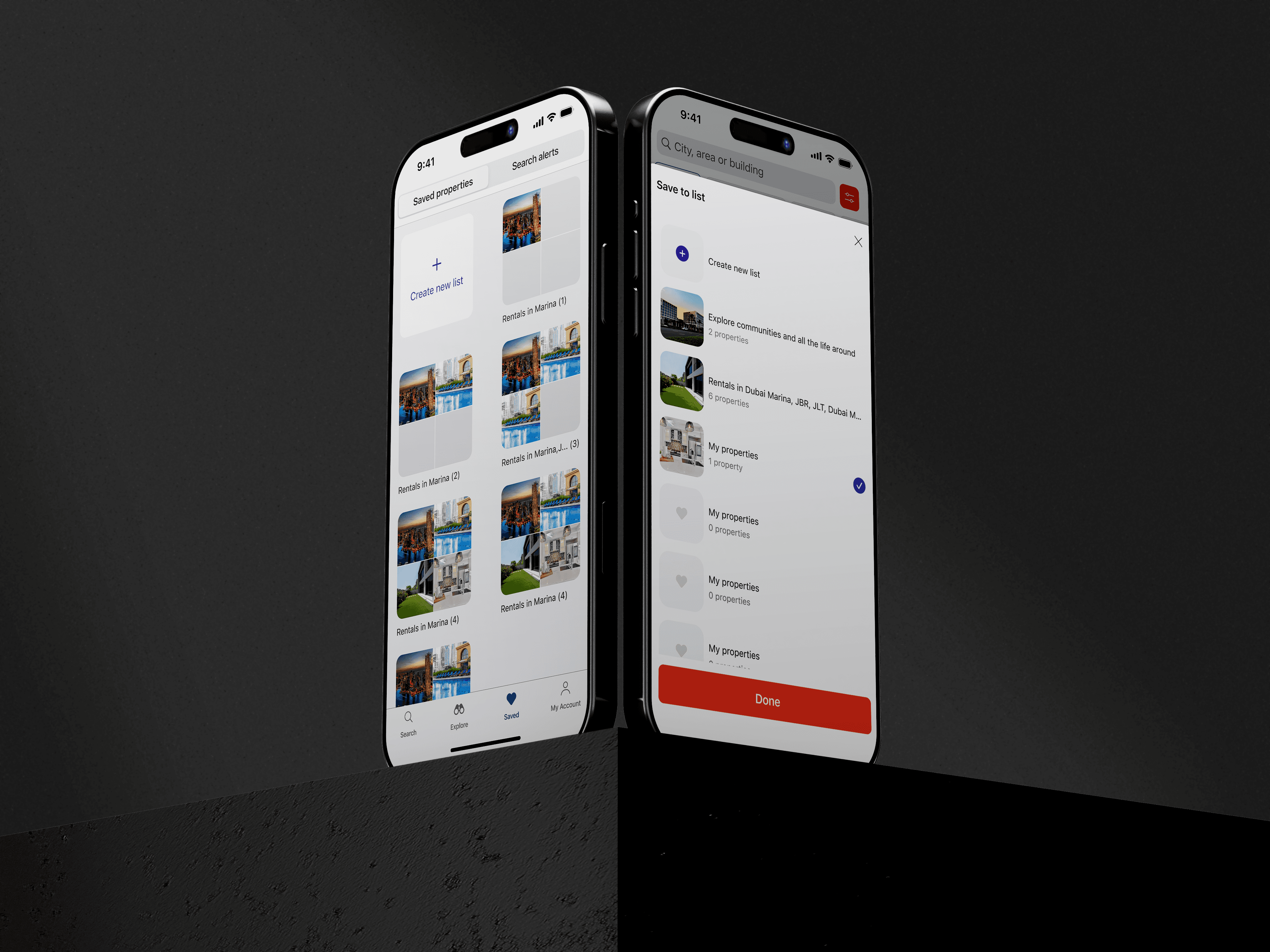
Property thumbnails helped users recognize lists at a glance. Lists with the most recent save appeared first, and the last-used list was preselected to avoid an extra selection each time.
On the Saved page, images from the first properties added to each list provided a visual preview for easier scanning.
Property thumbnails helped users recognize lists at a glance. Lists with the most recent save appeared first, and the last-used list was preselected to avoid an extra selection each time.
On the Saved page, images from the first properties added to each list provided a visual preview for easier scanning.

List selection

Saved page
Supporting Search Continuity
Empty states avoided dead ends by guiding users back to search and keeping them within the property-search journey. Once a list contained properties, sorting options helped users find relevant saves by recency, listing date, availability, or price.
Empty states avoided dead ends by guiding users back to search and keeping them within the property-search journey. Once a list contained properties, sorting options helped users find relevant saves by recency, listing date, availability, or price.

Empty-list state

Sorting options