FarmEasy
Redesigning Livestock Management for Group-Based Operations
Redesigning Livestock Management for Group-Based Operations
FarmEasy is an all-in-one platform designed to digitalize and streamline large-scale livestock operations. Building upon an initial prototype that lacked usability, I redesigned the experience into a cohesive, developer-ready product tailored to the practical needs of farm managers.
FarmEasy is an all-in-one platform designed to digitalize and streamline large-scale livestock operations. Building upon an initial prototype that lacked usability, I redesigned the experience into a cohesive, developer-ready product tailored to the practical needs of farm managers.
Context
B2B - AgriTech (Wellztech)
Role
Product designer
Platform
Mobile app
Duration
3 months, 2025
The Challenge
The Challenge
When I joined the project, the app had grown organically over time. New features had been layered on top of the original prototype without a cohesive structure. Flows were inconsistent, key actions were buried, and the layout focused on individual animals when daily work actually happens at the group level.
Critical scenarios like animal death or early slaughter weren't accounted for at all, so data quietly drifted from reality. Field managers were forced to work around the app rather than with it.
My role was to lead a structural redesign rather than a visual refresh, one that reflected how a farm actually operates day to day, and to deliver it as a development ready system the Wellztech team could build on.
When I joined the project, the app had grown organically over time. New features had been layered on top of the original prototype without a cohesive structure. Flows were inconsistent, key actions were buried, and the layout focused on individual animals when daily work actually happens at the group level.
Critical scenarios like animal death or early slaughter weren't accounted for at all, so data quietly drifted from reality. Field managers were forced to work around the app rather than with it.
My role was to lead a structural redesign rather than a visual refresh, one that reflected how a farm actually operates day to day, and to deliver it as a development ready system the Wellztech team could build on.
My Role & Process
My Role & Process
I led the redesign as the sole product designer on the project, working as a freelance partner with the Wellztech team over three months. While I owned the design decisions independently, the process was deeply collaborative. I worked directly with a farm manager throughout, holding regular review sessions to validate flows against real operational needs.
Although a formal usability study wasn't possible within the project scope, this continuous feedback loop with an active end user shaped every major decision. I delivered the final designs as a development ready handoff, after which the Wellztech team moved into implementation.
I led the redesign as the sole product designer on the project, working as a freelance partner with the Wellztech team over three months. While I owned the design decisions independently, the process was deeply collaborative. I worked directly with a farm manager throughout, holding regular review sessions to validate flows against real operational needs.
Although a formal usability study wasn't possible within the project scope, this continuous feedback loop with an active end user shaped every major decision. I delivered the final designs as a development ready handoff, after which the Wellztech team moved into implementation.
Discovery & Insights
Discovery & Insights
Discovery & Insights
To understand both the operational context and the existing market, I combined field observations with a review of livestock management tools. This helped me identify the workflows that mattered most and the gaps FarmEasy could address.
To understand both the operational context and the existing market, I combined field observations with a review of livestock management tools. This helped me identify the workflows that mattered most and the gaps FarmEasy could address.
Field observations
I visited the farm to observe daily operations and talk to the people running them, including the manager, feed operators, and health workers.
I visited the farm to observe daily operations and talk to the people running them, including the manager, feed operators, and health workers.


Cattle are managed in groups, not individually
Daily work is organized around routines such as feeding, treatment, and vaccination
Managers need visibility across operational progress, shipment readiness, and financial performance
Operations shift fluidly between individual, pen, row, group, and barn levels depending on the task
Cattle are managed in groups, not individually
Daily work is organized around routines such as feeding, treatment, and vaccination
Managers need visibility across operational progress, shipment readiness, and financial performance
Operations shift fluidly between individual, pen, row, group, and barn levels depending on the task
Competitive landscape
Most products covered basic tracking, but fewer supported a workflow that felt truly aligned with beef cattle operations, group-based management, and local needs such as Turkish language support.
Most products covered basic tracking, but fewer supported a workflow that felt truly aligned with beef cattle operations, group-based management, and local needs such as Turkish language support.
This review showed that while many tools covered core livestock records, fewer offered a structure centered on group operations, fast mobile usage, and local market needs. These gaps helped define FarmEasy’s product direction.
This review showed that while many tools covered core livestock records, fewer offered a structure centered on group operations, fast mobile usage, and local market needs. These gaps helped define FarmEasy’s product direction.

Key insights
Different roles needed different levels of visibility
Employees mainly handled data entry, while managers focused on costs, notifications, and performance. This highlighted the need for role-based access and a clearer separation between operational and financial visibility.
The workflow was mostly group-based, but exceptions happened at animal level
While everyday operations were managed at group level, cases such as death, forced slaughter, and treatment required animal-level flexibility.
Users needed flexibility for edge cases
Exceptional situations required room for notes, photo-based documentation, and safer ways to handle high-risk actions such as slaughter and stock updates.
Slaughter was not the end of the flow, but a decision point
Beyond marking an animal’s exit, slaughter also needed to support performance tracking through live weight, meat yield, yield ratio, and group-level comparison.
Cost tracking needed to connect daily operations with monthly reporting
Feed, medicine, vaccines, and fixed expenses were not viewed as isolated records, but as part of overall group performance.
Different roles needed different levels of visibility
Employees mainly handled data entry, while managers focused on costs, notifications, and performance. This highlighted the need for role-based access and a clearer separation between operational and financial visibility.
The workflow was mostly group-based, but exceptions happened at animal level
While everyday operations were managed at group level, cases such as death, forced slaughter, and treatment required animal-level flexibility.
Users needed flexibility for edge cases
Exceptional situations required room for notes, photo-based documentation, and safer ways to handle high-risk actions such as slaughter and stock updates.
Slaughter was not the end of the flow, but a decision point
Beyond marking an animal’s exit, slaughter also needed to support performance tracking through live weight, meat yield, yield ratio, and group-level comparison.
Cost tracking needed to connect daily operations with monthly reporting
Feed, medicine, vaccines, and fixed expenses were not viewed as isolated records, but as part of overall group performance.
Design
Design
Design
Overview
With these insights in hand, the redesign focused on five operational areas where the previous app had clear gaps: a manager-facing overview, daily operations, group and pen management, routines, and exception handling. The goal was to keep daily tasks fast and scannable while giving managers the depth they needed for decision-making.
With these insights in hand, the redesign focused on five operational areas where the previous app had clear gaps: a manager-facing overview, daily operations, group and pen management, routines, and exception handling. The goal was to keep daily tasks fast and scannable while giving managers the depth they needed for decision-making.
5 sections
5 sections
3 user roles
3 user roles
200+ screens
200+ screens
12 weekly review sessions
12 weekly review sessions
Design decisions

1
A dashboard built for managers, not operators
The manager needed visibility across stock, groups, and costs without digging through individual records. I designed Overview as a manager-first dashboard with filters by group and pen, and scoped cost data to the manager role only.
1
A dashboard built for managers, not operators
The manager needed visibility across stock, groups, and costs without digging through individual records. I designed Overview as a manager-first dashboard with filters by group and pen, and scoped cost data to the manager role only.
2
Group-level simplicity with animal-level depth
Operations happen at the group level, but treatment and health checks sometimes need individual detail. I kept group cards clean with only critical metrics on the surface, tucking secondary details inside, and exposed animal-level views only when the task required them.
2
Group-level simplicity with animal-level depth
Operations happen at the group level, but treatment and health checks sometimes need individual detail. I kept group cards clean with only critical metrics on the surface, tucking secondary details inside, and exposed animal-level views only when the task required them.
3
Merging related roles into one Operations tab
Feed and health work overlap constantly, so splitting them would force operators to switch contexts all day. I consolidated both workflows into a single Operations tab so daily tasks live in one place.
3
Merging related roles into one Operations tab
Feed and health work overlap constantly, so splitting them would force operators to switch contexts all day. I consolidated both workflows into a single Operations tab so daily tasks live in one place.
4
Stock management as a side-utility, not a tab
Stock tracking is operationally important but not a daily task. Putting it on the bottom tab bar would crowd the navigation; hiding it would make it invisible. I placed it inside the profile/settings area, where managers go intentionally, keeping the main navigation focused on day-to-day operations.
4
Stock management as a side-utility, not a tab
Stock tracking is operationally important but not a daily task. Putting it on the bottom tab bar would crowd the navigation; hiding it would make it invisible. I placed it inside the profile/settings area, where managers go intentionally, keeping the main navigation focused on day-to-day operations.
5
Designing for exceptions, not just the happy path
Operators couldn't always log data in real time, and edge cases like death or early slaughter weren't accounted for in the previous app. I built dedicated flows for these scenarios and used tags and primary buttons to flag incomplete records, keeping data accurate even when reality didn't follow the happy path.
5
Designing for exceptions, not just the happy path
Operators couldn't always log data in real time, and edge cases like death or early slaughter weren't accounted for in the previous app. I built dedicated flows for these scenarios and used tags and primary buttons to flag incomplete records, keeping data accurate even when reality didn't follow the happy path.
Key flows
The decisions above shaped how the product behaves day to day. These flows are a walkthrough of how the redesigned system supports daily farm operations, across the core scenarios that managers and operators rely on most.
The decisions above shaped how the product behaves day to day. These flows are a walkthrough of how the redesigned system supports daily farm operations, across the core scenarios that managers and operators rely on most.
Manager dashboard & Custom reports
The dashboard consolidates farm operations that were previously tracked across spreadsheets, paper, and WhatsApp. I designed it mobile-first since managers spend most of their time in the field, with global filters by time, pen, and group, plus chart-level filters for deeper exploration.
Custom reports can be generated and exported directly from the same screen, without switching to a desktop tool.
The dashboard consolidates farm operations that were previously tracked across spreadsheets, paper, and WhatsApp. I designed it mobile-first since managers spend most of their time in the field, with global filters by time, pen, and group, plus chart-level filters for deeper exploration.
Custom reports can be generated and exported directly from the same screen, without switching to a desktop tool.
Dashboard overview
Report creation
Group & barn management
The previous system tracked groups by entry date and cattle breed, so I kept that mental model but added group numbers for faster in-app reference.
Each group card surfaces only the most critical metrics like progress, status, and current group cost through tags and progress indicators that let managers compare groups at a glance.
All secondary details live inside the card as a collapsible scrollable view, keeping the layout scannable without sacrificing depth.
The previous system tracked groups by entry date and cattle breed, so I kept that mental model but added group numbers for faster in-app reference.
Each group card surfaces only the most critical metrics like progress, status, and current group cost through tags and progress indicators that let managers compare groups at a glance.
All secondary details live inside the card as a collapsible scrollable view, keeping the layout scannable without sacrificing depth.
Group exploration
Group creation
Barns tab handles location. Each barn is built around two opposing rows of pens with a central walkway, and operators move through that walkway to inspect cattle, so the layout mirrors that physical structure.
A barn-level summary sits at the top, with pen-by-pen detail below, and quick switching between barns keeps navigation fast.
Summary cards surface essential operational signals such as feed delivery and active treatments, without overlapping the Operations tab.
Transfers and exits also live here, since these are location-driven actions. A separate farm-wide overview, built at the client's request, replaces the spreadsheet they were using with a structured view of the same data.
Barns tab handles location. Each barn is built around two opposing rows of pens with a central walkway, and operators move through that walkway to inspect cattle, so the layout mirrors that physical structure.
A barn-level summary sits at the top, with pen-by-pen detail below, and quick switching between barns keeps navigation fast.
Summary cards surface essential operational signals such as feed delivery and active treatments, without overlapping the Operations tab.
Transfers and exits also live here, since these are location-driven actions. A separate farm-wide overview, built at the client's request, replaces the spreadsheet they were using with a structured view of the same data.
Barn overview
Daily operations
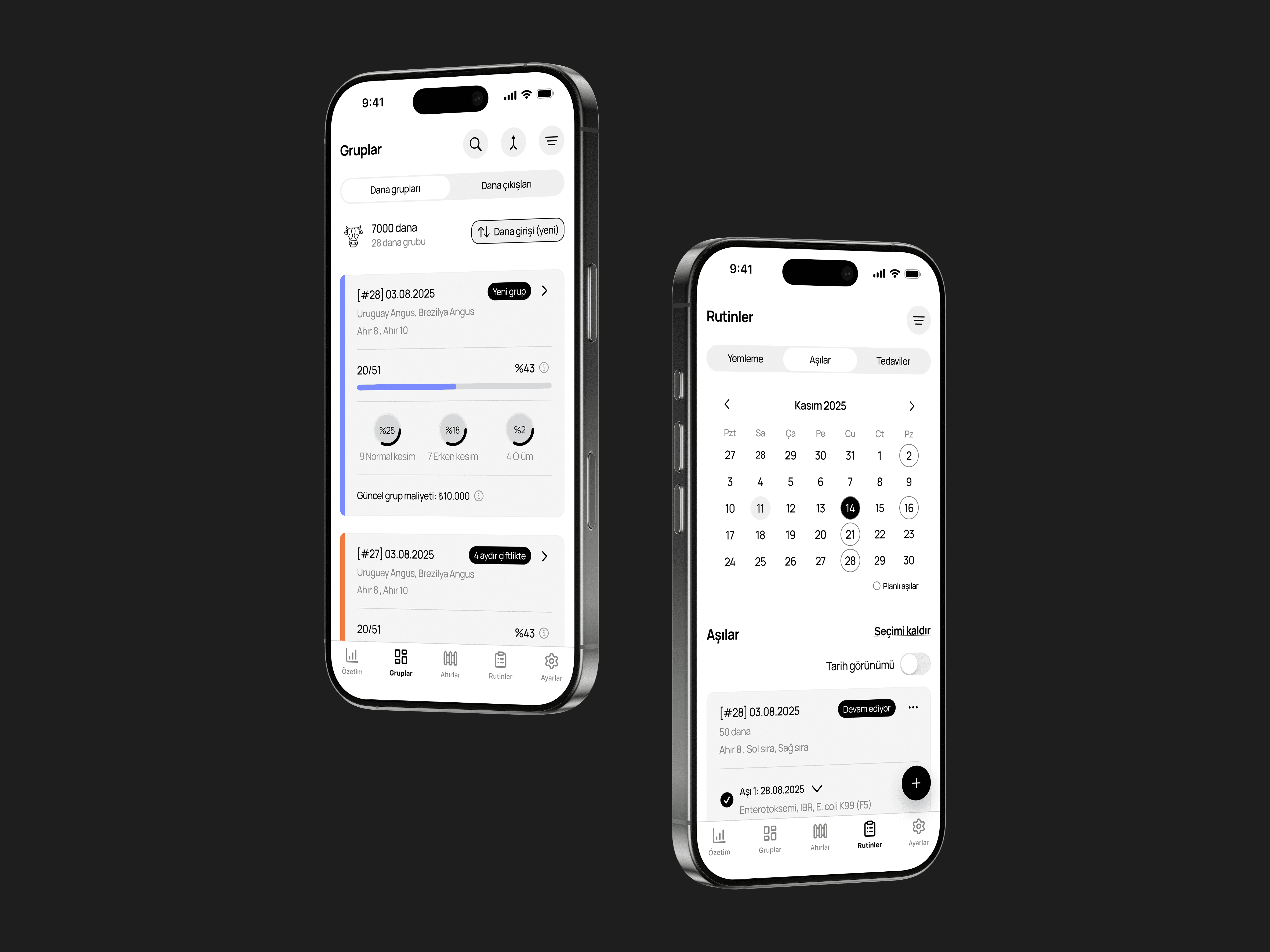
The previous app split feed and health into separate tabs, but the two roles share daily observations: feeders notice animals that look unwell, and health workers check whether cattle are eating properly. I consolidated both into a single Operations tab with three sub-tabs for feed routines, vaccinations, and treatments.
Feed comparisons matter daily, so the feed view keeps yesterday's and today's amounts side by side. Pre-built rations sit at the top since they're used most often, while custom mixes and second feedings remain one tap away. Feeding is tracked by row rather than by pen, since feed is delivered along each row of the barn, so I structured each row as its own card. Tags and CTAs make the status of each row scannable at a glance, and sorting surfaces unfed rows first.
Vaccinations open with a calendar view, so operators can see planned vaccinations and active protocols across any selected date. Treatments happen at the individual animal level even though the system tracks groups, so I supported them with notes and photo attachments.
The previous app split feed and health into separate tabs, but the two roles share daily observations: feeders notice animals that look unwell, and health workers check whether cattle are eating properly. I consolidated both into a single Operations tab with three sub-tabs for feed routines, vaccinations, and treatments.
Feed comparisons matter daily, so the feed view keeps yesterday's and today's amounts side by side. Pre-built rations sit at the top since they're used most often, while custom mixes and second feedings remain one tap away. Feeding is tracked by row rather than by pen, since feed is delivered along each row of the barn, so I structured each row as its own card. Tags and CTAs make the status of each row scannable at a glance, and sorting surfaces unfed rows first.
Vaccinations open with a calendar view, so operators can see planned vaccinations and active protocols across any selected date. Treatments happen at the individual animal level even though the system tracks groups, so I supported them with notes and photo attachments.
Feed routines
Vaccinations
Treatments
Treatments
Stock management
Inventory looks simple on the surface, but each category behaves differently underneath. Feed combines stock levels, raw material entries, purchasing, and warehouse checks in a single integrated view, while vaccines and medications carry their own item lists that auto-populate during stock entry.
To handle this complexity without exposing it, I structured each category around three sub-tabs covering inventory, warehouse, and purchasing, so managers can navigate the full operational picture without losing context between actions.
Inventory looks simple on the surface, but each category behaves differently underneath. Feed combines stock levels, raw material entries, purchasing, and warehouse checks in a single integrated view, while vaccines and medications carry their own item lists that auto-populate during stock entry.
To handle this complexity without exposing it, I structured each category around three sub-tabs covering inventory, warehouse, and purchasing, so managers can navigate the full operational picture without losing context between actions.
Stock overview
Cattle exits and designing for exceptions
Cattle exit is one of the most critical operational moments on a farm, and the previous app only tracked standard slaughter. I expanded it to cover early slaughter and death as well, since these directly affect yield, meat output, and group performance, and operators needed to log them with the same care as routine exits. Notes and photo attachments support the rare-but-real cases that don't fit a structured form.
The exit flow itself is built for flexibility. Operators can move cattle one by one, by pen, or by entire group, depending on whether the situation is routine or exceptional. The same principle runs across the system: cattle transfers, custom rations, and other low-frequency actions are all designed to handle edge cases without slowing down the common path.
A separate decision: even though FarmEasy is delivered as a B2B service with farms set up by the company, I kept farm and barn creation accessible inside settings. Farms shouldn't have to depend on a vendor every time their physical layout changes.
Cattle exit is one of the most critical operational moments on a farm, and the previous app only tracked standard slaughter. I expanded it to cover early slaughter and death as well, since these directly affect yield, meat output, and group performance, and operators needed to log them with the same care as routine exits. Notes and photo attachments support the rare-but-real cases that don't fit a structured form.
The exit flow itself is built for flexibility. Operators can move cattle one by one, by pen, or by entire group, depending on whether the situation is routine or exceptional. The same principle runs across the system: cattle transfers, custom rations, and other low-frequency actions are all designed to handle edge cases without slowing down the common path.
A separate decision: even though FarmEasy is delivered as a B2B service with farms set up by the company, I kept farm and barn creation accessible inside settings. Farms shouldn't have to depend on a vendor every time their physical layout changes.
Cattle exit overview
Exit creation