MagicBoard
Magicboard is a role-based CMS for preparing, reviewing, and publishing movies and TV series.
Magicboard is a role-based CMS for preparing, reviewing, and publishing movies and TV series.
Publishing video content involves much more than uploading a file. Magicboard connects two workflows: Editors prepare content and supporting assets, while Publishers review submissions, request revisions, or approve them for release. The experience keeps ownership, status, and next steps clear throughout the process.
Publishing video content involves much more than uploading a file. Magicboard connects two workflows: Editors prepare content and supporting assets, while Publishers review submissions, request revisions, or approve them for release. The experience keeps ownership, status, and next steps clear throughout the process.
Context
Case study - Content management
Case study -
Content
management
Role
Product designer
Platform
Web app
Duration
3 weeks, 2025

The Context
The Context
MagicBoard is a product design case study for a video streaming platform, built around two user roles: editors, who upload and manage movies and TV series, and publishers, who review and publish them.
I focused on creating a clear workflow for large media files, layered content structures, and the handoff between these two roles.
MagicBoard is a product design case study for a video streaming platform, built around two user roles: editors, who upload and manage movies and TV series, and publishers, who review and publish them.
I focused on creating a clear workflow for large media files, layered content structures, and the handoff between these two roles.
Two roles
Two roles

Uploads and maintains movies and TV series, adds the required information and assets, and submits content for review.
Uploads and maintains movies and TV series, adds the required information and assets, and submits content for review.

Reviews submitted content, requests changes when needed, and schedules or publishes approved content.
Reviews submitted content, requests changes when needed, and schedules or publishes approved content.
The problem
The problem
Managing streaming content means handling large files, layered content structures, and review handoffs within a single workflow.
Managing streaming content means handling large files, layered content structures, and review handoffs within a single workflow.
Large Uploads
Large video files can take time to upload, preventing editors from moving on to other tasks.
Large video files can take time to upload, preventing editors from moving on to other tasks.
Content Gets Complex
Series, seasons, episodes, and media assets create multiple layers of information to manage.
Series, seasons, episodes, and media assets create multiple layers of information to manage.
Review Process
Review status and requested changes can become unclear during editor–publisher handoffs.
Review status and requested changes can become unclear during editor–publisher handoffs.
UX strategy
UX strategy
Based on the brief, I reframed the main workflow requirements into three design questions.
Based on the brief, I reframed the main workflow requirements into three design questions.
Keep Work Moving
How might we enable editors to upload large and multiple files without interrupting their workflow?
Keep Work Moving
How might we enable editors to upload large and multiple files without interrupting their workflow?
Background uploads
Visible progress
Multitasking
Structure Complex Content
How might we simplify managing metadata and visual assets across movies, series, seasons, and episodes?
Structure Complex Content
How might we simplify managing metadata and visual assets across movies, series, seasons, and episodes?
Content hierarchy
Guided metadata
Segmented thumbnails
Clarify Review Handoffs
How might we make feedback, revisions, and publishing status clear across a shared editor–publisher workflow?
Clarify Review Handoffs
How might we make feedback, revisions, and publishing status clear across a shared editor–publisher workflow?
Role-aware views
Comments
Visible statuses
Benchmarking the workflow
Benchmarking the workflow
I reviewed direct competitors and other relevant tools—including Vimeo, YouTube Studio, Strapi, Frame.io, VEED, Zype, TurboScribe, and Dropbox—to compare common patterns across uploading, content organization, and review workflows.
I reviewed direct competitors and other relevant tools—including Vimeo, YouTube Studio, Strapi, Frame.io, VEED, Zype, TurboScribe, and Dropbox—to compare common patterns across uploading, content organization, and review workflows.

Patterns worth keeping
Friction observed
Uploading
Clear drop zones, background progress
Small modals, interrupted workflows
Content management
Visible metadata, grid/list views, clear hierarchy
Choose Long forms, risky bulk edits, duplicate entry points the list sheet
Review workflow
Review filters, status tags, activity history
Hidden publish actions, unclear editing context
KPIs - How I’d measure success
KPIs - How I’d measure success
Upload Completion Rate
Percentage of upload flows completed without errors or abandonment.
Time to Publish
Median time between content submission and publication.
First-Pass Approval Rate
Percentage of submissions approved without being returned for fixes.
Workflow CSAT
Satisfaction reported by editors and publishers after completing key upload, review, and publishing tasks.
Upload Completion Rate
Percentage of upload flows completed without errors or abandonment.
Time to Publish
Median time between content submission and publication.
First-Pass Approval Rate
Percentage of submissions approved without being returned for fixes.
Workflow CSAT
Satisfaction reported by editors and publishers after completing key upload, review, and publishing tasks.
The Experience
The Experience
-Editor experience-
-Editor experience-
The editor experience is designed to keep high-volume content work moving. Editors can track each item’s status, continue working during large uploads, and move movies or series from draft to review without losing context.
The editor experience is designed to keep high-volume content work moving. Editors can track each item’s status, continue working during large uploads, and move movies or series from draft to review without losing context.
Keeping work and status visible
Keeping work and status visible
The dashboard provides an overview of uploaded movies, series, and episodes, while My Uploads brings drafts, review requests, requested fixes, and published content into one workspace.
Status filters and visible metadata help editors quickly identify what needs attention.
The dashboard provides an overview of uploaded movies, series, and episodes, while My Uploads brings drafts, review requests, requested fixes, and published content into one workspace.
Status filters and visible metadata help editors quickly identify what needs attention.

Weekly upload and status overview

Movie uploads

Series organized by season and episode

My uploads-card view
A guided Movie upload
A guided Movie upload
Movie creation is divided into four focused steps: details, thumbnails, audio and subtitles, and preview. Large files continue uploading in the background, allowing editors to complete the remaining information without waiting.
Thumbnails can also be assigned by genre, location, or age segment within the same flow.
Movie creation is divided into four focused steps: details, thumbnails, audio and subtitles, and preview. Large files continue uploading in the background, allowing editors to complete the remaining information without waiting.
Thumbnails can also be assigned by genre, location, or age segment within the same flow.

Large drag-and-drop upload area
Large drag-and-drop upload area

Background video upload
Background video upload

Movie details
Movie details

Audience-segmented thumbnail management
Audience-segmented thumbnail management

Audio & subtitles
Audio & subtitles

Preview
Preview
Managing Series at scale
Managing Series at scale
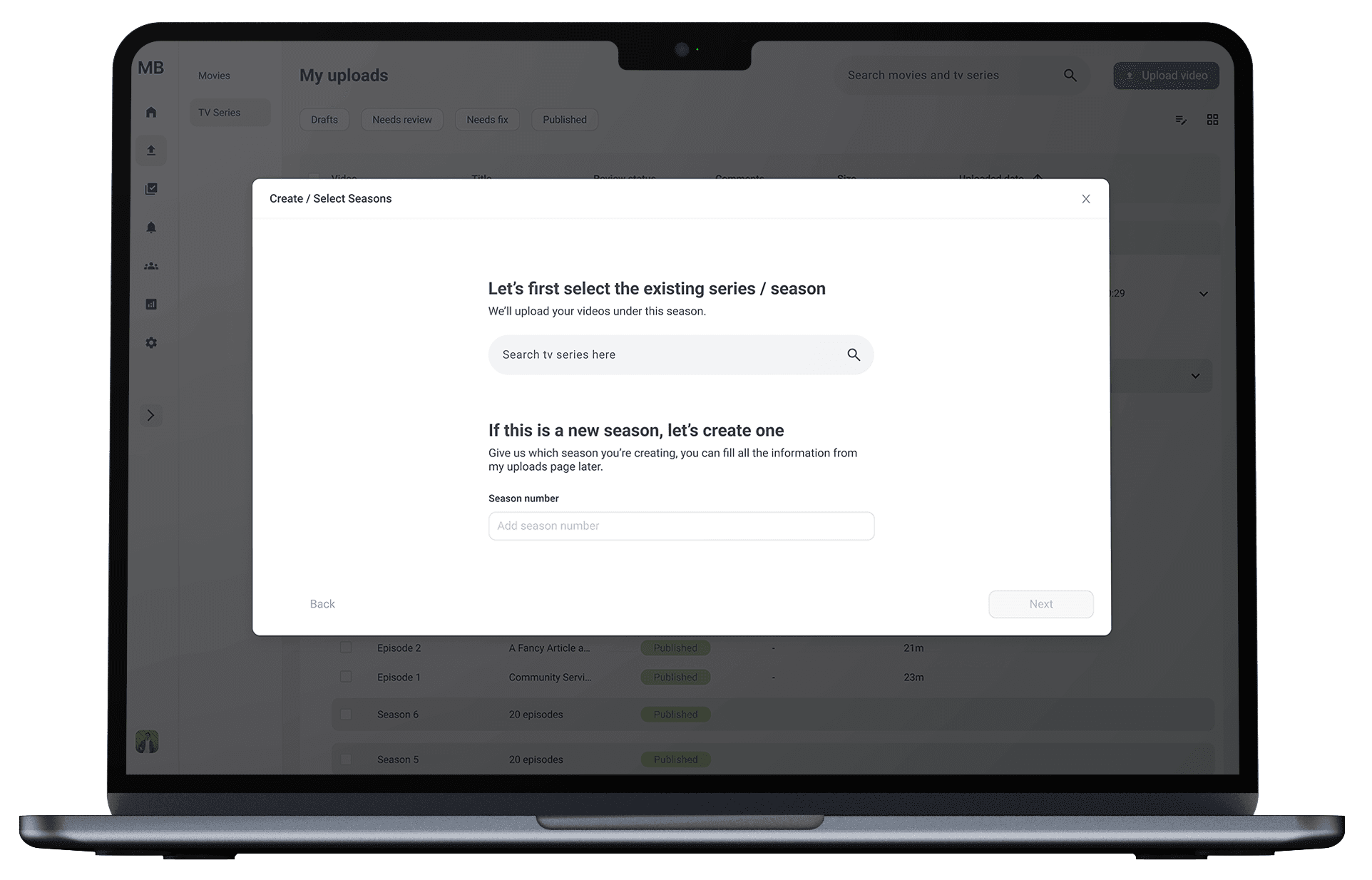
Series add another layer of complexity through seasons, episodes, and repeated media assets. A persistent content hierarchy keeps editors oriented while episode-level details, thumbnails, audio, and subtitles are managed within the series.
Multiple episode files can upload in the background while the editor continues organizing the season.
Series add another layer of complexity through seasons, episodes, and repeated media assets. A persistent content hierarchy keeps editors oriented while episode-level details, thumbnails, audio, and subtitles are managed within the series.
Multiple episode files can upload in the background while the editor continues organizing the season.

Uploading multiple videos in the background
Uploading multiple videos in the background

Create or select a series
Create or select a series

Creating a new series
Creating a new series
Adding to an existing series or season
Adding to an existing series or season

Supporting errors
Supporting errors
Handing content off for review
Handing content off for review
Before submitting, editors can review the complete content record, leave contextual comments, and assign a publisher. Once submitted, the item moves into a visible review state, keeping feedback and ownership connected to the content.
Before submitting, editors can review the complete content record, leave contextual comments, and assign a publisher. Once submitted, the item moves into a visible review state, keeping feedback and ownership connected to the content.

Sending for review
Sending for review

Commenting
Commenting
Full editor flow
Full editor flow
-Publisher experience-
-Publisher experience-
The publisher experience helps publishers move from a workload overview to a content-level decision without losing context.
The publisher experience helps publishers move from a workload overview to a content-level decision without losing context.
Reviewing and publishing content
Reviewing and publishing content
The publisher experience brings review priorities, content details, comments, and publishing actions into one workflow. Publishers can see what needs attention, review each submission in context, request changes, or publish it immediately or schedule it for later.
The publisher experience brings review priorities, content details, comments, and publishing actions into one workflow. Publishers can see what needs attention, review each submission in context, request changes, or publish it immediately or schedule it for later.

Publisher dashboard

Publisher dashboard - notifications

My reviews

Publish

Comment
Full publisher flow
Full publisher flow
User Testing Plan
User Testing Plan
As part of the case study, I outlined a usability testing plan focused on the core editor and publisher workflows.
As part of the case study, I outlined a usability testing plan focused on the core editor and publisher workflows.
Participants
Participants
10 participants: 5 editors and 5 publishers with CMS experience.
10 participants: 5 editors and 5 publishers with CMS experience.
Method
Method
Moderated remote usability testing using task-based scenarios and a think-aloud approach.
Moderated remote usability testing using task-based scenarios and a think-aloud approach.
Measures
Measures
Task completion rate
Critical errors
Time on task
System Usability Scale (SUS)
Task completion rate
Critical errors
Time on task
System Usability Scale (SUS)
Key flows to validate
Key flows to validate
Editor
Upload a video and complete its details while the file continues uploading
Create or select a series and organize its seasons and episodes
Submit content for review and respond to comments
Publisher
Identify content that requires attention
Review a submission and request changes through comments
Publish the content immediately or schedule it for later
Editor
Upload a video and complete its details while the file continues uploading
Create or select a series and organize its seasons and episodes
Submit content for review and respond to comments
Publisher
Identify content that requires attention
Review a submission and request changes through comments
Publish the content immediately or schedule it for later